Cloud Cost Reduction
The largest component of a typical cloud bill is the cost of CPU and memory. These resources are bundled in the machine instances provided by your cloud provider (nodes in Kubernetes). Container orchestration platforms like Kubernetes rely on a quota system to schedule application instances onto machines. Scheduling involves a constraint satisfaction problem, wherein application instances must be matched to machines such that the aggregate quota on each machine doesn’t exceed its capacity. This quota system introduces a scheduling bottleneck, and is the primary culprit behind low resource utilization. Voithos solves the overprovisioning problem by setting resource quotas according to consumption, which allows your K8s scheduler to fit your applications onto fewer nodes.
To demonstrate this, let’s provision a GKE cluster with the cluster autoscaler enabled, and deploy five copies of the online boutique application that we used previously in our tutorial. Figure 1 shows the cluster dashboard view during the initial hours following installation. The path to cost savings is accomplished using the following three steps.
-
Install Voithos and observe the default recommendations. In our example, we see that the total requests recommended by Voithos (blue line) under the default autoscaling group configuration is ~30% lower than the kubestate requests (yellow line) for both CPU and memory. Also shown is the underlying CPU and memory usage (green line), and the total CPU and memory capacity in the cluster (orange line). In effect, the orange line reflects what you are paying for, and the green line reflects what you are using (utilization=green/orange). Our cluster is running at ~20% CPU utilization and ~10% memory utilization, which is typical.
-
Configure Voithos to autoscale your workloads. Next, we’ll install the custom
VoithosAutoscalingGroupresource provided here, but withenablePatching=falseset universally, to specialize Voithos specifically for the online boutique microservices. Disabling patching allows you to view the impact that Voithos will have without imparting changes to your cluster. Here we’re configuring Voithos to be much more aggressive with it’s CPU recommendation, while keeping the memory configuration close to the default settings. Note that in this case the Kubernetes scheduler is being constrained by CPU, not memory, and so reducing memory requests would increase the likelihood of OOM errors while having no effect on the node count. -
Turn on automatic patching. Now that we’re comfortable with the recommendations shown in region 2 in Figure 1, we can enable automatic patching on the online boutique resources. To do this, we can patch the autoscalinggroup with
enablePatching=trueset universally. Within region 3 in Figure 1, we observe the kubestate requests (yellow line) slowly converge to Voithos’ recommendations (blue line) over the course of 1 hour, which is the value that we’ve specified in the.spec.configuration.patching.schedulefield. As expected, we observe a subsequent decrease in the node count following this update.
The impact Voithos has on the costs of this cluster can be precisely quantified by comparing the node count before (region 1) and after (region 4) installation. We’ve reduced the node count from 5 to 3, which directly translates to a 40% reduction in the cost of the underlying nodes!
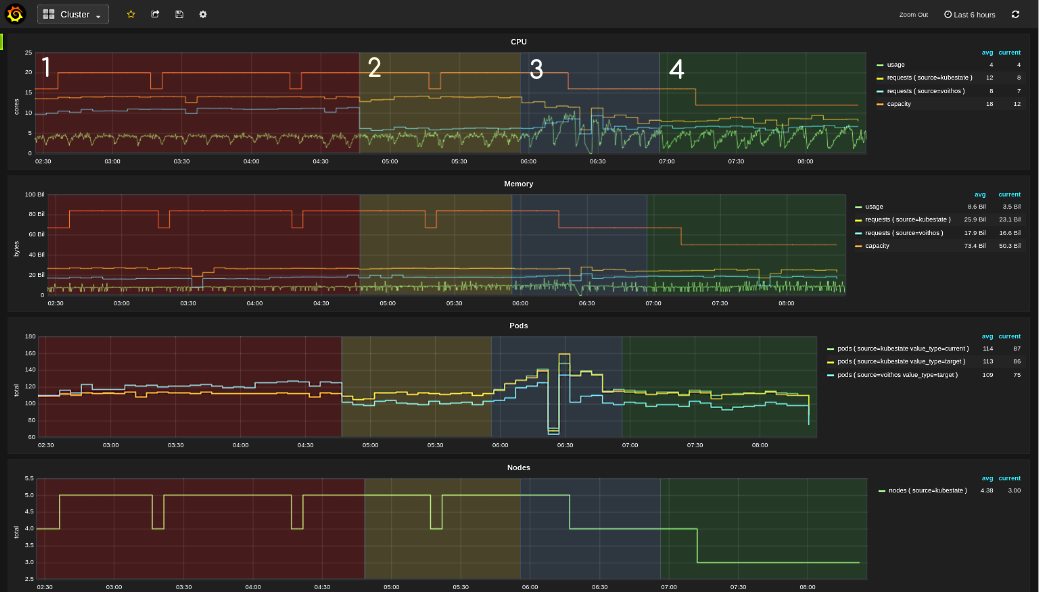
Fig.1 Cluster-level dashboard view showing the three phases of a Voithos deployment: 1) install Voithos and evaluate its default behavior, 2) configure Voithos for your application(s) and evaluate the updated behavior, 3) enable patching and observe the kubestate requests decrease gradually. The last step is to observe your cluster node count gradually decrease (bottom plot), and start saving. Legend: green=cadvisor, yellow=kubestate, blue=voithos.
The actual allocation (yellow line) never fully converges to Voithos’ recommendation (blue line); this is primarily because we’ve only selected the onlineboutique namespaces in our voithos autoscaling group. Deviations are also introduced by the fact that the blue line is calculated using the real-time requests recommendations along with simulated replicas values assuming those requests were applied, while the yellow line is produced from the requests in kubestate, which get updated less frequently.
Voithos works alongside your cluster autoscaler to decrease your node count. If you’re not already using node autoscaling, the K8s cluster autoscaler and Karpenter are both mature, widely adopted options.